
Note: this article deals with the separation of business and private data on smartphones. If you want to know how to separate business and private phone numbers on one device, please go to the following article: Dual-SIM and phone number separation.
Business and private data on one device?
There are company devices that are intended for only a single business use (COSU = Corporate-Owned, Single Use), for example presenting at a trade fair stand. Others are set up for several, exclusively business uses — this concept is called COBO (Corporate-Owned, Business Only). If users stick to the usage guidelines, only business data ends up on these devices.
Mixed business and private use
It looks different when private devices are also used for the job (BYOD = Bring Your Own Device) or when the company phone is explicitly intended for mixed business and private use (COPE = Corporate-Owned, Personally Enabled).
Protection of private and business data
In these cases both business and private data end up on the mobile devices. This is problematic in terms of data protection, for instance when business contacts are used in apps that transfer data to the USA (see: WhatsApp on the company phone). Substantial fines under the GDPR can be at stake here; however, this was already critical before the GDPR under the German Federal Data Protection Act.
Employees, on the other hand, of course want their private data to remain private and not to be viewed by IT, which is unlikely to increase acceptance of company devices. This is especially true for the young talents of "Gen Z". For them the smartphone is the central technical device in everyday life and is used comprehensively and intensively as a communication hub, calendar, entertainment platform, etc.
A company phone perceived as unsafe in this context becomes a killer for employee satisfaction. On the other hand, a company phone can also become a benefit when it is high-quality and securely integrated.

Data security
But the mobile security of company data must also be considered. The leakage of critical or sensitive business data must in any case be prevented. This is made more difficult by private use of business devices — among other things because users are sometimes not too careful about data security and install insecure mobile apps from various app stores.
In BYOD scenarios where private devices are also used on the job with the company''s approval, the devices are even more out of IT''s control. Outdated mobile operating systems, rooted phones and skipped security patches make it nearly impossible to make a "brought-in" device a truly safe part of the company network.
In the worst case, IT does not even know that the device is being used at all ("Dark BYOD").
Also read: The nine biggest BYOD risks.
Data separation via container app
To effectively separate business from private data on mobile devices, many companies rely on a so-called container app. This is a mobile application that fences off a protected area (container) on the mobile device. Typically the container is administered and monitored by IT.
Goal: IT compliance of the device with regard to data security and data protection. A well-known container app is "SecurePIM", developed by the Munich-based software company Materna Virtual Solution.
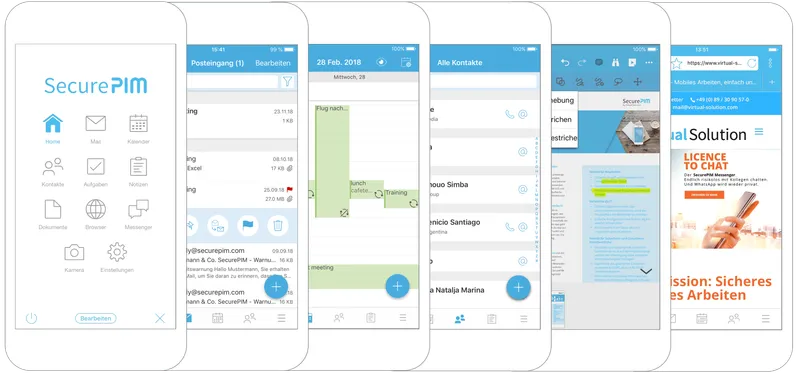
The SecurePIM graphic shows several containerized standard applications such as calendar, mail and documents. (Source: Materna Virtual Solution) For users this means that on the smartphone they can only process company data within a protected and encrypted environment. Applications critical from a data protection perspective, such as WhatsApp, are also denied access to business contacts.
Container apps solve the problems described but also bring drawbacks, such as vendor lock-in and extra effort for updates. Some container apps also offer only limited possibilities for text editing and file sharing in general. Interfaces to other apps can also cause new problems.
In the worst case, restricted user experiences with the container mean that employees prefer not to use the intended applications at all. This would achieve the exact opposite of what the introduction of the container app was actually meant to enable — namely secure and efficient Mobile Work.

If users do not accept the solutions, nobody is helped.
Data separation via Mobile Device Management
A second option is the use of Mobile Device Management software. Such tools are often part of larger EMM suites; the abbreviation stands for Enterprise Mobility Management.
Common MDMs like those from VMware, Microsoft (Intune), Baramundi or Cortado also create a separated area on the smartphone. However, here the "container" hooks into the mobile operating system itself and not at the application level.
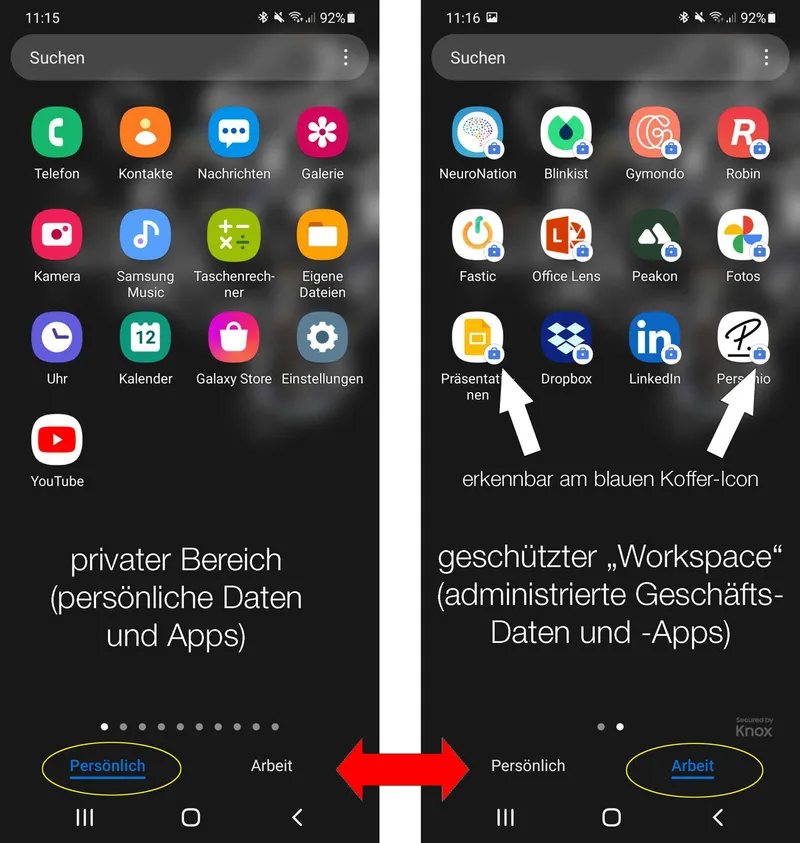
Example of an Android workspace (right). The workspace icons are marked as encrypted by a small lock. Besides separating an administrable workspace, MDM applications offer additional functions that are extremely helpful for implementing a company-wide mobile strategy.
First is so-called staging: configuring devices and setting up applications before they are handed over to the user. When the user receives the new company phone and connects it to a Wi-Fi network for the first time for enrollment, the user profile and the apps licensed by the company are automatically set up in the workspace.
Second, MDMs also allow devices to be clearly inventoried. Read more about what an MDM can do: This is why you now need an MDM system.
Data separation on rented smartphones
When you rent a company phone at Everphone, you always get an MDM as well — unless your company already uses MDM software. In that case, this software is integrated into our rental devices.
Nothing then stands in the way of private use of the company phone, provided this is desired by company management. In our experience this is not only the variant with the highest acceptance among employees, who only have to own one device, but also the most sustainable and environmentally friendly.